Mobile Safari VRAM and 3D memory protection
Unmanaged 3D configurators leak GPU buffers on every material swap and spin the graphics chip at 60 FPS even while a shopper reads product specs. Aircada protects mobile conversion with a staged startup pipeline, deferred end-of-frame VRAM cleanup, and dirty-state rendering that pauses GPU draws when the scene is still.

Preventing mobile browser tab crashes and thermal throttling
On desktop workstations with 16 GB of dedicated VRAM, sloppy 3D memory management rarely surfaces during testing. On an iPhone or Android device, however, mobile browsers enforce strict per-tab memory limits. In unmanaged 3D web apps, swapping a part or material only drops the JavaScript reference while leaving vertex buffers, materials, and high-resolution textures orphaned in GPU memory. After a handful of option swaps, iOS Safari reloads the page and wipes the buyer's custom build.
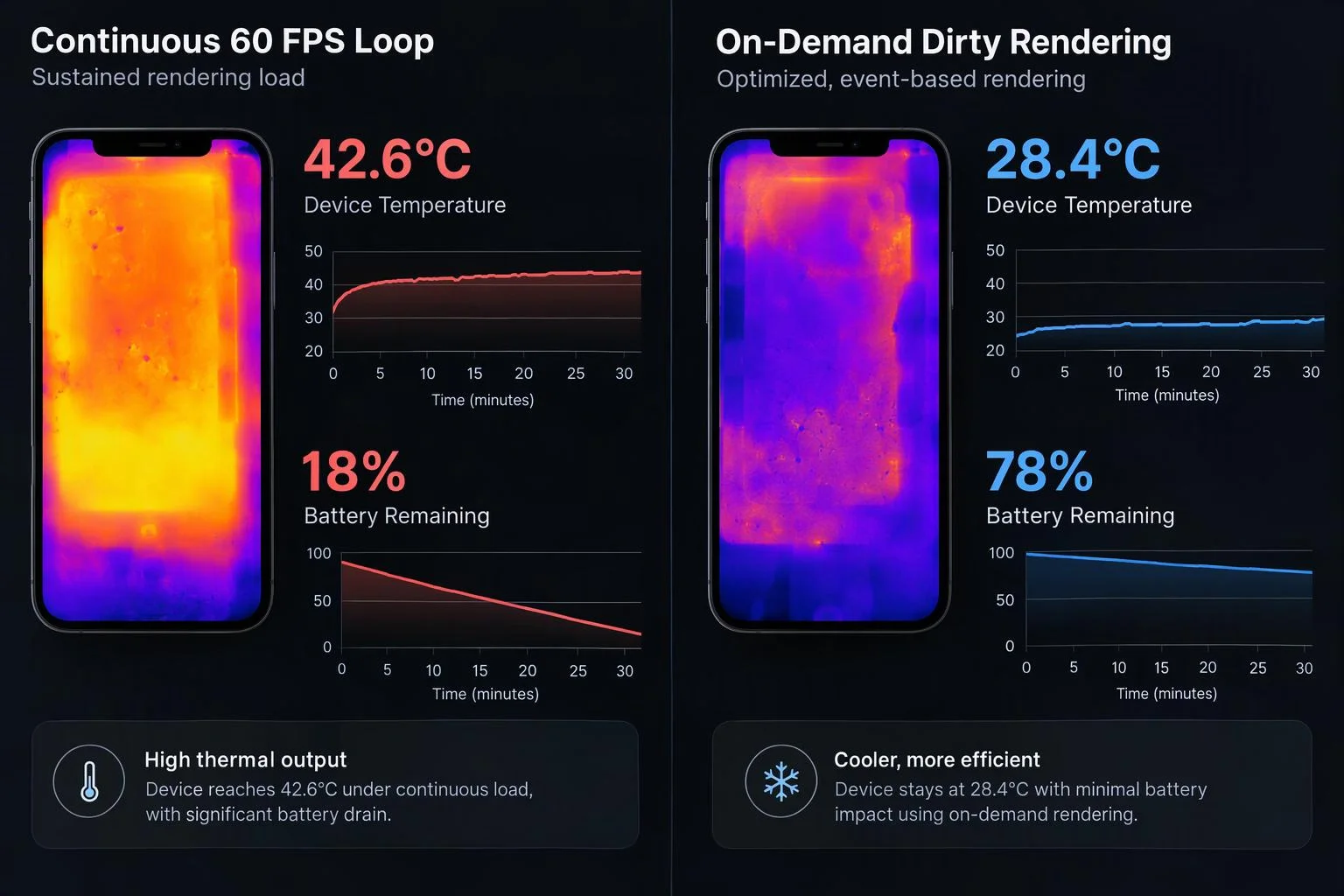
Running a continuous 60 FPS render loop while a customer scrolls product specs or fills out engraving text creates a second mobile problem: rapid battery drain and thermal throttling that makes touch scrolling feel sluggish. Aircada addresses both failure modes inside the core runtime using staged startup initialization, deferred end-of-frame VRAM disposal, and dirty-state on-demand frame rendering. On Shopify and headless storefronts, that stability lets mobile buyers explore dozens of options and finish checkout without losing their configuration. In production, Cinch Gaming runs 78 optimized GLB parts and 70 GPU-compressed KTX2 textures across its unified PlayStation and Xbox customizer, powering more than 50,000 custom builds added to cart with a 191% add-to-cart lift.
How Aircada manages a 3D session from boot to checkout
RUNTIME LIFECYCLE PIPELINE
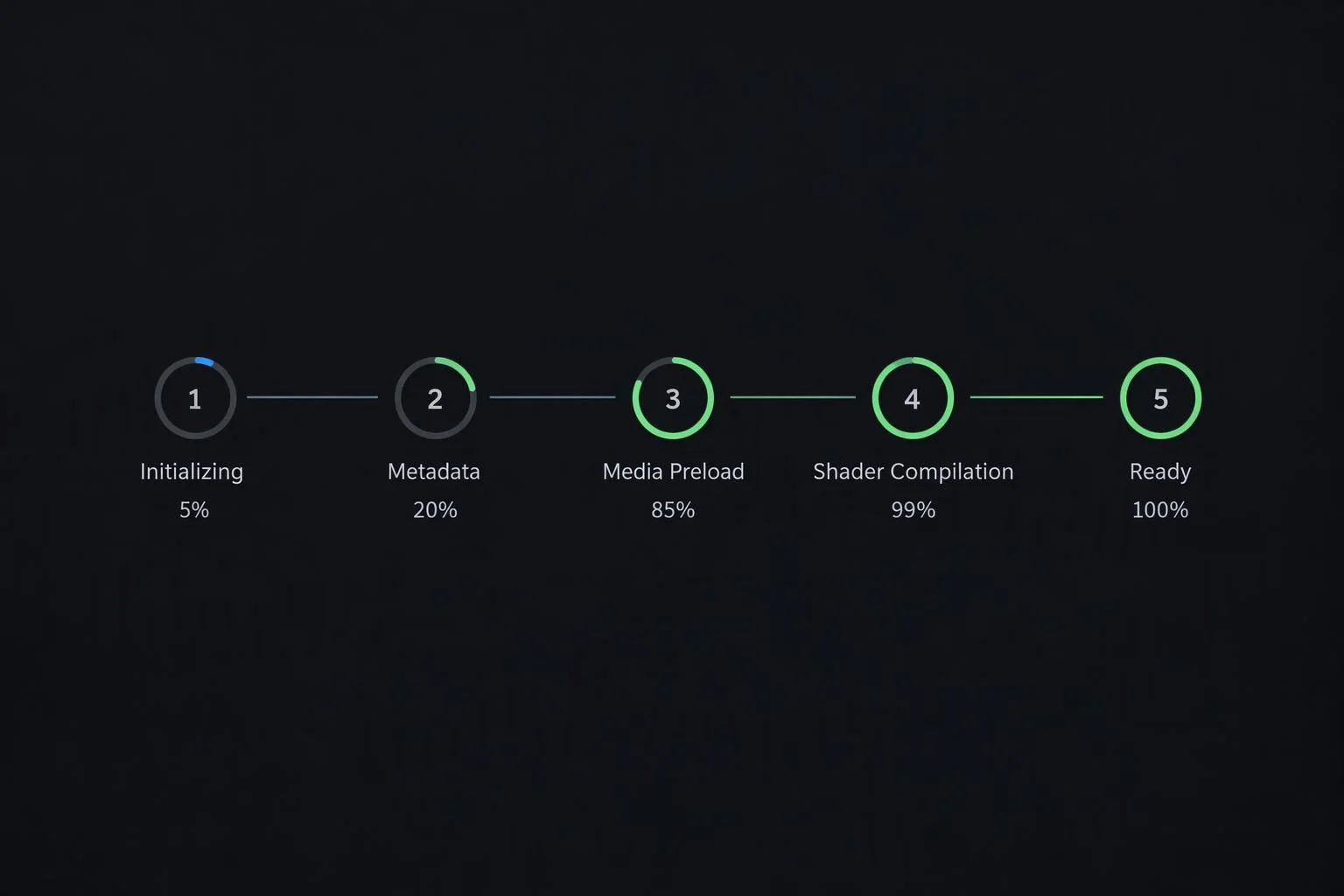
Staged initialization, idle preloading & shader pre-compilation
Startup executes through ordered lifecycle stages: core engine and manager setup, scene hydration, non-blocking background media preloading (capped at 3 concurrent fetches during browser idle slices), async shader compilation, and 2 warmup frames before lifting the preloader. Every phase is guarded by a 15-second watchdog timeout so a stalled asset never freezes the storefront.
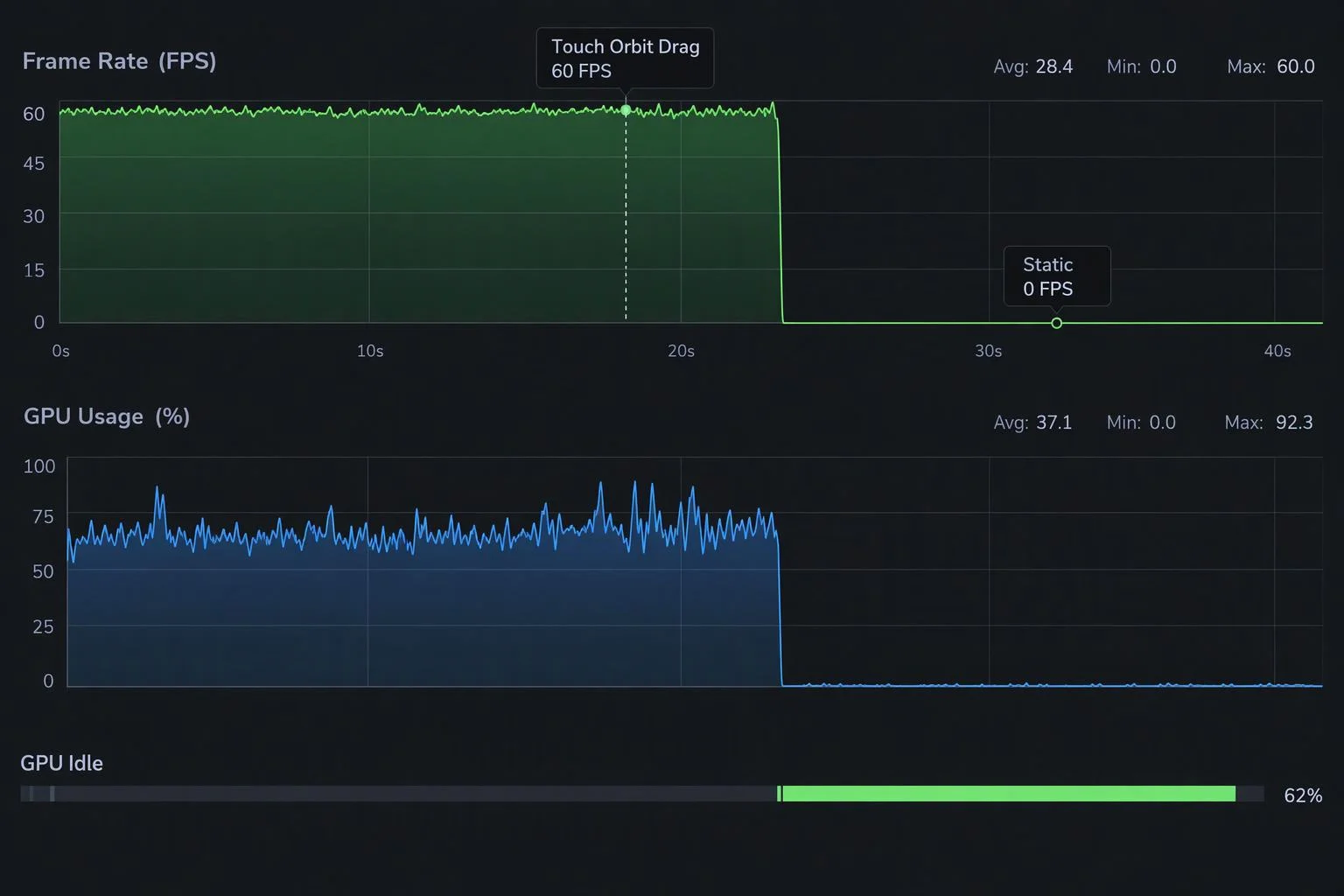
Dirty-state on-demand frame rendering
Aircada's update loop only submits a GPU render pass when an active observer flags the scene as dirty, such as during touch orbit inertia, keyframe playback, or a live option swap. The moment motion settles, GPU frame draws stop completely, conserving battery and keeping mobile devices cool while shoppers read pricing and specs.
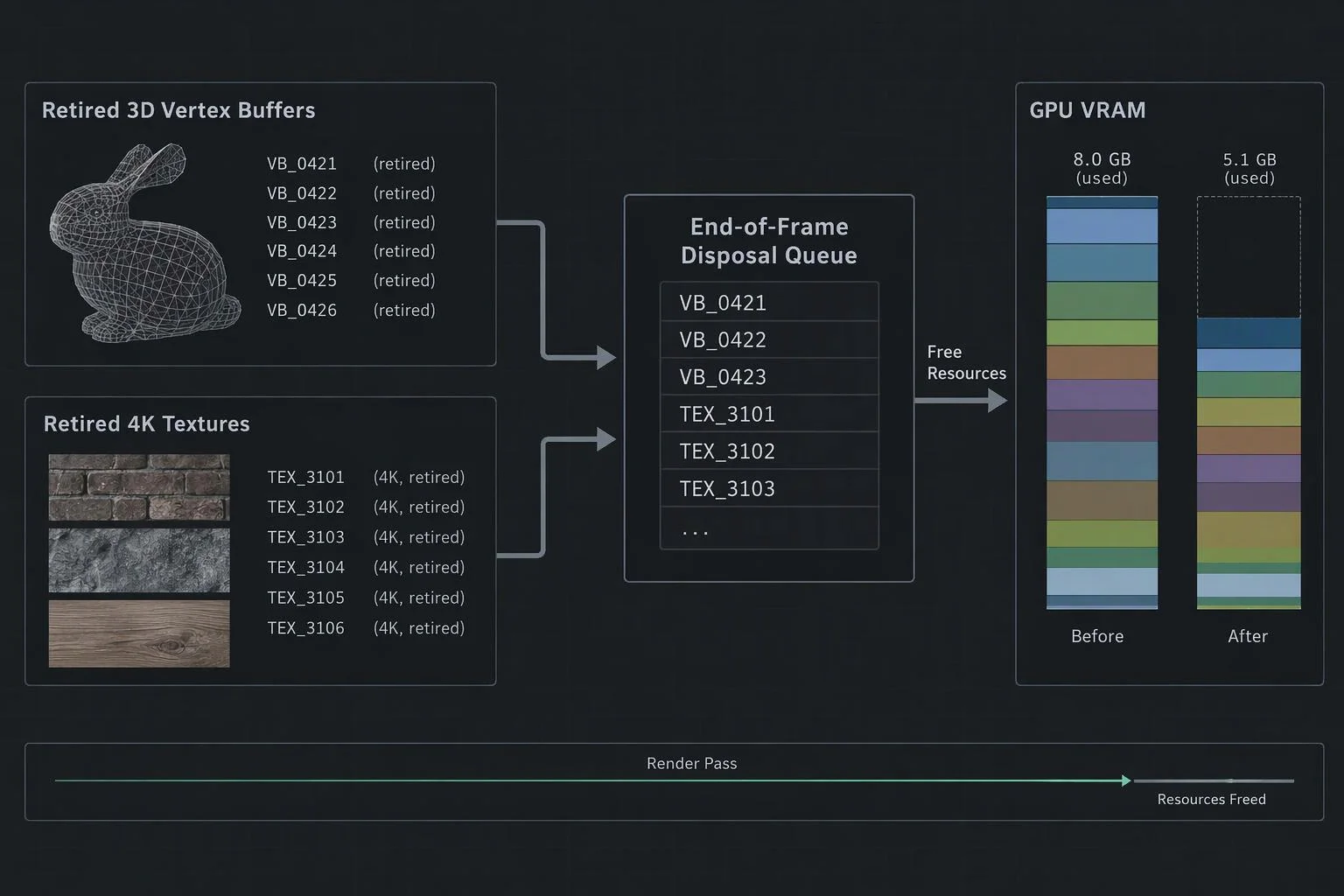
Deferred end-of-frame GPU memory disposal
When a modular part is swapped, hidden, or unmounted, Aircada queues its retired geometries, materials, and unshared child textures into a disposal registry. At the final step of the frame, after active WebGPU or WebGL draw passes finish, every retired resource is freed cleanly from VRAM.
| Lifecycle Stage | Engine Mechanism | Buyer & Mobile Impact |
|---|---|---|
| 1. Network & Decoder Preconnect | Preconnects to asset storage hosts and pre-fetches Draco / KTX2 WASM decoders in parallel | Eliminates cold TLS handshake delays before 3D geometry begins streaming. |
| 2. Core & Scene Hydration | Ordered manager, unit, and dataset setup guarded by a 15-second per-phase watchdog | Prevents race conditions or indefinite blank screens if a slow network request stalls. |
| 3. Background Media Preloading | Idle-time image preload queue (max 3 concurrent requests, 2-second idle fallback) | Warms upcoming swatch images without starving active checkout or UI network traffic. |
| 4. Async Shader Compile & Warmup | Compiles material shaders asynchronously and runs 2 warmup frames before reveal | Removes the jarring first-touch stutter when shoppers rotate the 3D model for the first time. |
| 5. Active Session & End-of-Frame Cleanup | Dirty-state render gating, per-unit end-of-frame VRAM disposal, and unused texture sweeps | Drops idle GPU draw passes to zero and keeps VRAM flat across dozens of material swaps. |
Engineered safeguards against leaks and race conditions
LOW-LEVEL MEMORY ARCHITECTURE
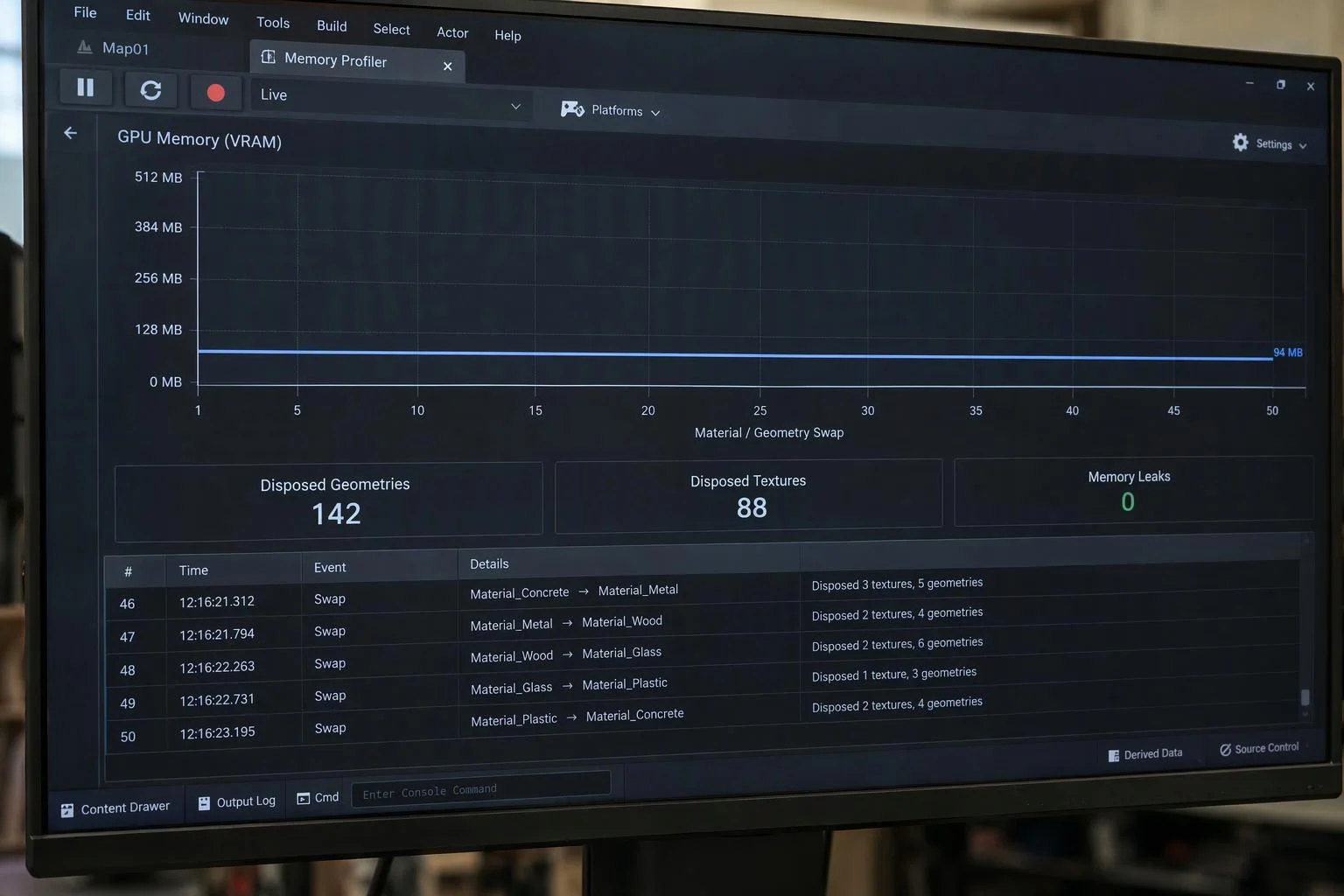
Why end-of-frame disposal prevents WebGPU command buffer crashes
Destroying a texture or vertex buffer mid-frame while a render pass is still encoding commands causes WebGPU validation errors and visual glitches. Aircada queues retired buffers during option transitions and flushes the disposal queue strictly during the final post-render step of each frame.
Per-unit resource tracking and unused texture sweeps
Every geometry, material, and local texture created for a scene unit is tracked by unit ID so removing a modular sub-assembly queues its entire resource set automatically. Separately, the material cache scans active scene references at the end of a frame and disposes cached textures that are no longer used anywhere in the build.
Live memory telemetry and leak auditing
Engineering teams can inspect real-time counters for tracked local geometries, materials, and textures alongside active cached GLTFs, textures, and materials using {{@link:docs.engine.telemetry-and-benchmarking|label=built-in GPU telemetry}} to confirm flat memory usage across extended customization sessions.
Focus recovery and dynamic frame monitoring
Aircada tracks rolling 30-frame render averages to detect sustained frame drops, cleanly stops the animation loop when rendering is disabled or unmounted, and triggers a clean redraw when a shopper returns focus to the browser tab.
Built for demanding mobile commerce journeys
PRODUCTION OUTCOMES
Zero iOS Safari reloads during deep customization sessions
Shoppers on iPhones and iPads cycle through dozens of modular attachments, high-resolution swatches, and custom text variations without triggering mobile WebKit memory reloads.

Cool devices and smooth scrolling on content-heavy product pages
By skipping GPU draw passes whenever the camera and animations are still, mobile phones stay cool and preserve responsive touch scrolling all the way through checkout.
Responsibility Tiers
- 1 Native Aircada layer
- 1 Aircada Configuration layer
- 1 Custom Implementation layer
- 1 External layer
Responsibility Boundaries for Mobile Memory & Lifecycle
How Aircada's runtime engine, Studio preload settings, and storefront page integration divide responsibilities.
Staged startup pipeline, end-of-frame VRAM disposal & dirty-state sleep
- Native Aircada
- Ordered phase orchestration with 15-second watchdog guards, idle-time background preloading, async shader pre-compilation, deferred end-of-frame GPU buffer deallocation, and on-demand rendering.
Asset preload flags & KTX2 / Draco compression targets
- Aircada Configuration
- Configured in Aircada Studio so initial startup loads only required default meshes and compressed textures while optional modular attachments load on demand.
Branded HTML splash screen & custom preloader overlays
- Custom Implementation
- Authoring an optional self-contained custom HTML preloader that renders instantaneously while 3D assets and shaders warm up underneath.
Browser WebGPU / WebGL2 context allocation & OS tab memory ceilings
- External
- Hardware and browser-enforced memory budgets on iOS WebKit, Android Chrome, and desktop graphics drivers.
Frequently Asked Questions
Why doesn't JavaScript's built-in garbage collector clean up 3D memory automatically?
How does on-demand rendering work when camera damping or smooth transitions are enabled?
How does Aircada prevent the 3D viewer from freezing the first time a shopper touches it?
What happens when the configurator unmounts in a React or Shopify storefront?
Deliver photorealistic glass, liquids, and gemstones on mobile
With your geometry and memory footprint optimized, explore how Aircada renders physically accurate glass refraction, Snell's Law IOR, and chromatic dispersion in the browser.
Related capabilities
Explore the adjacent capabilities and integrations that pair with this workflow.

GPU texture compression for fast mobile 4K finishes
Fast mobile 3D mesh compression for heavy CAD
True-scale wood grain and fabric across modular parts